
MFA Bootstrapping: How Attackers Bypass Microsoft Entra ID Security (Even With MFA ON)


TL;DR
- MFA Bootstrapping allows attackers to register their own authentication methods after gaining initial account access, potentially bypassing existing security measures.
- Micosoft Entra ID (the login system behind Microsoft 365) has a common configuration gap that makes this bypass easy—even for companies who pay for advanced security plans.
- The fix is a single policy: "Securing Security Info Registration." A Conditional Access Policy that takes about fifteen minutes to turn on to restrict security to registered networks and trusted users.
MFA is supposed to be the gold standard for protecting company accounts... But what if your MFA solution isn't enough?
Earlier this year, the Tenfold team was alerted to unusual mailbox activity for a major client. These types of events are alarming, to be sure, but nothing a seasoned SecOps team hasn't dealt with before...
...But what if your MFA solution isn't enough? What if it's insecure by default, to the point that it compromises your entire authentication chain?
In this first installment of The Worst Bytes, we cover how your Microsoft Entra configurations are making it even easier for attackers to compromise your environment.
What is MFA Bootstrapping
This is how our client got hit—the attacker used a stolen password, accessed a user's account, and registered their own method, giving them reliable, ongoing access to sensitive resources.
Thankfully, the Tenfold team caught on before the attacker could wreak total havoc. But afterward, we still wanted to know how this happened, and how to help other businesses avoid the same gap. As it turns out, this kind of attack is usually aided by simple misconfigurations—not a new vulnerability in Microsoft's software.
This technique has a lot of other names, which all sound like they belong in a spy movie or maybe the Situation Room. MFA Arbitrage was the runner up. The only reason I didn’t choose it was because I lack neither the tailored suit nor security clearance to justify my name under a headline about it.
What This Means for Your Business
Our client was not careless with their security preferences—they had a dedicated IT team, responsible for multinational tickets and infrastructure. They just missed one of the many common gaps we've seen in the wild.
According to the 2026 edition of IBM's "Cost of a Data Breach Report," US companies spent an average of $11.5 million on data breaches—over a million dollars more than last year and twice the global average. The majority of these breaches are either directly caused, or enabled by attackers exploiting these same gaps.
Thankfully, the fix is simple. If you're not interested in the details, skip to The Fix for instructions on plugging the leak.
How Microsoft Handles Login Security
In practice, this is accomplished either by default, or with custom configurations.
When Entra ID is first applied to a tenant, it comes pre-enabled with a set of Security Defaults, which cover some baseline controls—e.g. restricting access to administrator resources and turning off insecure authentication methods.
Full Entra Security Defaults Baseline Protection Details.
What's relevant here is the MFA requirement, where all users must set up their Microsoft Authenticator app before their first sign in.
Security Defaults are a reasonable starting point, but it's all-or-nothing: you can't fine-tune when someone can register a method, let alone who is even allowed to in the first place. There is no extra step to confirm the person registering is the real employee, so whoever signs in first with the password gets to claim the account's MFA.
For more in depth protection, e.g. securing when and how an MFA method is registered, you'll need to shut off the Security Defaults and shell out for a paid plan.
A paid Entra Plan unlocks Conditional Access Policies (CAPs)—customizable "If-Then" statements that control login behavior. Configuring CAPs allows for more granular control over how your tenant manages access, but will completely disable the Security Defaults.
Here's an example:
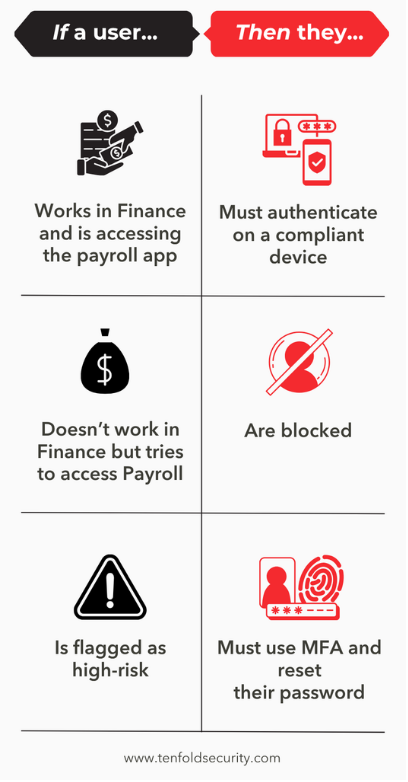
Why "Having a Security Policy" isn't the same as "Being Protected"
Unlike a firewall—which blocks everything by default and only allows what you explicitly permit—Conditional Access Policies work the opposite way: they only restrict what you specifically tell them to. Anything you don't configure is left wide open... including MFA registration.
Once attackers have obtained user credentials—either through phishing or purchase on the Dark Web—attackers try one of two* methods to get in:
Scenario 1 - Security Defaults Enabled
Because the Security Defaults enforce MFA registration, but have no protections in the way of registering a new method, attackers are banking on low-hanging-fruit to get initial access to an account.
The easiest way is to target very new or very old (i.e. dormant) accounts. Because registration is pushed to users after their first login, an attacker that manages to sign in before the real employee will actually be prompted to set up their own method. After an attacker registers their own method, Microsoft treats it as the account's trusted second factor.
Dormant accounts are especially risky because no one is using them, so no one notices anything wrong. A real employee might spot odd prompts or get locked out. An unused account can stay compromised for months.
Scenario 2 - CAPs Enabled, MFA not Enforced
That leaves two problems:
2.) Even without stolen credentials, accounts are exopsed. With no MFA in the way, the organization is still vulnerable to pre-covid era password attacks, such as password spraying. It only needs one employee to have picked a weak password.
Attackers are betting on the glaring irony here; organizations pay for an advanced Entra plan, hoping for better protection, and become laughably insecure in the process.
The fix
These attacks are enabled by the ability to register an authentication method, so long as the person doing it is logged into their account. To defend against this type of attack, we can add a roadblock in the registration process itself.
The CAP template, "Securing Security Info Registration," does exactly that. Using the same example from earlier, authentication looks like this:
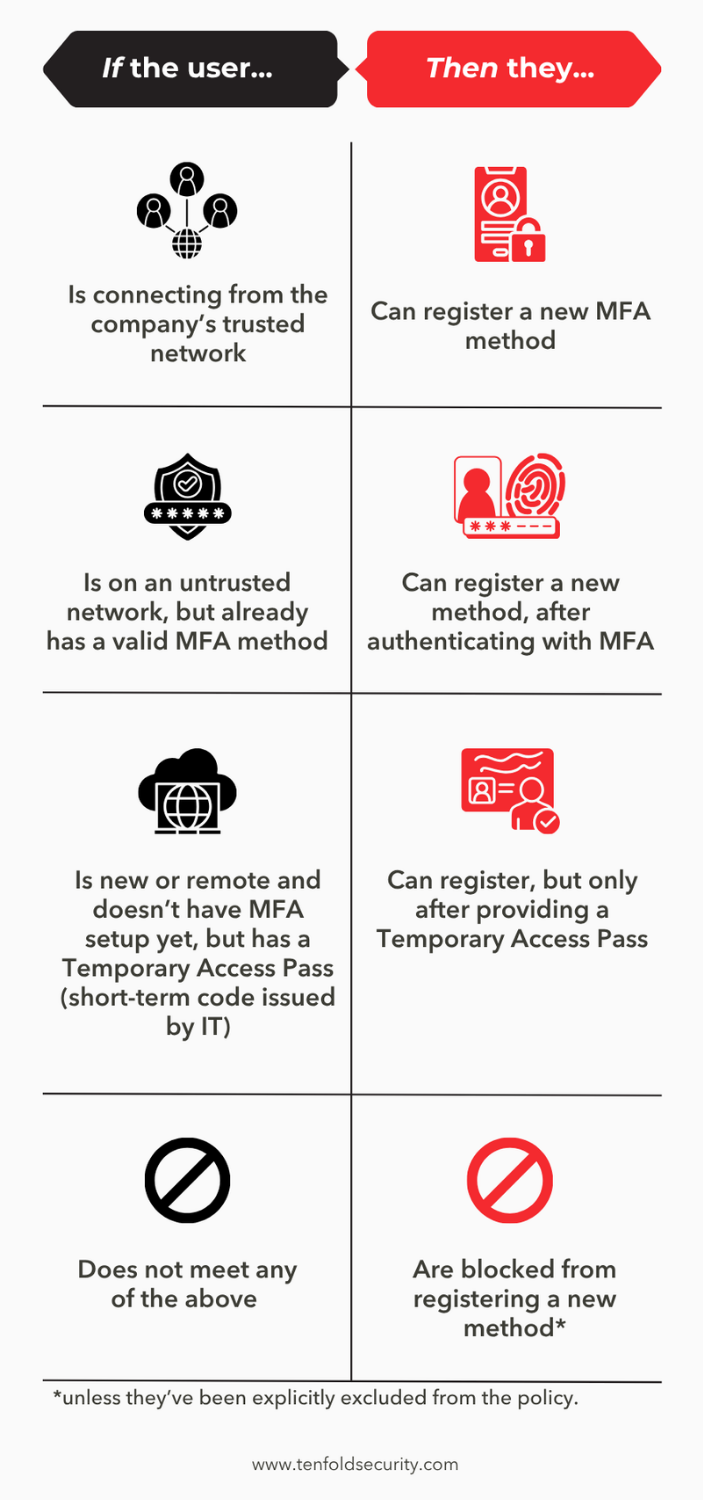
How does this policy stop MFA Bootstrapping? Instead of letting anyone with a valid password add a phone or authenticator app, it only allows registration from a trusted location, or after the person proves who they are with an existing MFA method or a Temporary Access Pass (TAP). An attacker with only a stolen password can't meet any of those conditions, so they can't lock in their access.
To apply the template:
- Navigate in the Entra Portal to Conditional Access > Create New Policy From Template.
- Select Securing Security Info Registration (while you're there, check out the other templates under "Secure Foundation," too).
- Make sure to turn on "Report Only mode first". As the name suggests, this won't enforce the policy user-side, but still let you see who it would affect. This way, you can avoid any unforeseen effects, then adjust as necessary.
- Once you've confirmed that everything is working correctly, switch it on.
This works because the policy treats registration like any other sensitive application, such as payroll, and locks it down with the same tools. New employees and remote hires aren't left out, since IT can issue a TAP when they onboard.
What the policy doesn't do: it stops attackers from making their access permanent, but it doesn't stop the initial sign-in. That's why it works best alongside the other "Secure foundation" templates, especially the one requiring MFA for all users.
Final Thoughts
Our client had Entra up and running; most users had MFA for their accounts; Entra was enabled for the tenant. They were doing more right than most companies we see, yet they still got hit.
Thus, the uncomfortable takeaways should be this:
While nation-state hackers, international ransomware gangs, and AI cyberweapons are still a threat, for the past three decades, most breaches we've seen on the news were enabled by fifteen-minute-fixes like these that had gone overlooked.
Some of you are reading this article and wondering if your Entra environment is configured correctly, whether you have Conditional Access Policies enabled, or even how you'll make sure the slew of other fifteen-minute-fixes won't fall through the cracks. These are exactly the conversations we like to have.
I hope you've enjoyed reading the first installment of The Worst Bytes. My goal here was to create something that can bring value to both the underpaid CISO and the extinguisher-wielding IT tech—hopefully I've achieved that in some capacity.
I also encourage you to check out the other posts Tenfold Security has to offer. Aaron Weissenfluh's posts offer invaluable insight for small businesses and executives alike.
Further Reading
- Darknet Diaries – Ep. 112 Dirty Coms, Ep. 118 Hot Swaps, and Ep. 154 Hijacked Line on SIM swapping and account takeovers.
- IBM: Cost of a Data Breach Report 2026
- Microsoft Learn: Entra Security Defaults – full baseline protection details
- Microsoft Blog: Unmasking EvilTokens: Getting to the root of device code phishing
- Microsoft: Entra ID Plans and Pricing
- Common Entra ID Security Assessment Findings – Part 4: Weak Conditional Access Policies
- Jonathan Edwards – Stop MFA Hijacks: The One Conditional Access Policy You're Missing
- Huntress: Inside Kali365 – a look at the Phishing-as-a-Service tools attackers use for token theft
- Microsoft Learn: Conditional Access deployment planning – for IT teams ready to implement
- The CEO of Cybersecurity – Aaron's article comparing CISO risk vs. compensation


Suite 50
Kansas City, MO 64105
